HibouAir Platform

Access your air quality data wherever your project needs it

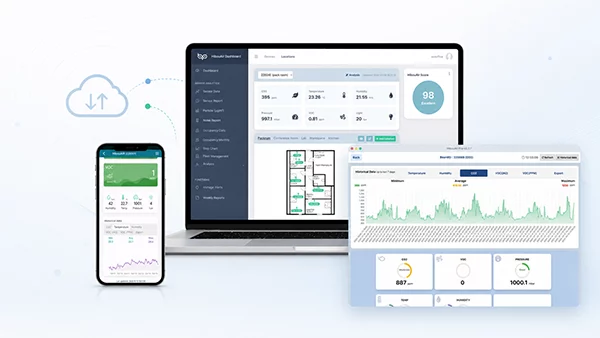
HibouAir Platform connects cloud analytics, mobile access and desktop monitoring tools with HibouAir air quality devices. Whether your project needs remote monitoring, local access, cost-effective deployment or advanced reporting, HibouAir gives you the right way to view, analyze and use your environmental data.

HibouAir Platform dashboard overview placeholder Mobile access Cloud dashboard Desktop reports
Platform access

Three ways to work with HibouAir data

Different projects need different levels of access. Some teams need a cloud dashboard for remote monitoring, some need local desktop reporting, and some simply need quick mobile access during setup, inspection or everyday checks.

Cloud dashboard for remote monitoring

Available with Cloud Enterprise & Cloud Lite

The Smart Analytical Dashboard is available with HibouAir Cloud Enterprise and Cloud Lite solutions. It is the right option when your team needs remote access, live widgets, historical reports, alerts, fleet management, AI air quality scores, raw data downloads and API access from a browser.

View dashboard features

Mobile app for quick local access

Available for HibouAir users

The HibouAir mobile application supports quick access to nearby HibouAir devices and is useful across cloud, desktop and standalone workflows. It helps users check air quality, interact with devices and perform everyday monitoring from a phone.

View mobile app

Desktop app for local monitoring and reports

Used with Desktop solution

The HibouAir desktop application is used with the Desktop solution for local monitoring. With BleuIO, users can scan HibouAir devices, view real-time data, retrieve historical measurements and export CSV, Excel and PDF reports.

View desktop app
Workflow

From measurement to the right monitoring workflow

1

Measure

HibouAir devices monitor CO₂, particulate matter, temperature, humidity, pressure, VOC, noise and other parameters depending on device model.

2

Choose deployment

Use Cloud Enterprise, Cloud Lite, Desktop or Standalone depending on whether your project needs remote access, local monitoring or a cost-effective setup.

3

Access data

Use the Smart Analytical Dashboard, mobile application or desktop application depending on your selected solution and daily workflow.

4

Analyze and act

Review live data, reports, alerts, exports, heat maps and trends to support ventilation, safety, compliance or research decisions.

Solution workflow

Which HibouAir solution workflow fits your project?

Need remote access and multi-location visibility?

Cloud Enterprise or Cloud Lite Smart Analytical Dashboard + Mobile Application

Best for teams that need browser-based monitoring, alerts, reports, fleet management and access from anywhere.

Explore dashboard

Need local monitoring and professional reports?

Desktop Solution Desktop Application + Mobile Application

Best for users who want to monitor locally, retrieve historical data and export CSV, Excel or PDF reports using a computer.

View desktop app

Need simple on-site checks?

Standalone or local workflow Mobile Application

Best for quick device access, local checks and everyday air quality visibility from a smartphone.

View mobile app
Remote or local

Remote or local air quality monitoring?

HibouAir supports both remote and local monitoring needs. This allows customers to choose a setup based on project size, data access requirements and budget.

Cloud Enterprise / Cloud Lite

Remote monitoring

Use cloud-connected monitoring when teams need access from different locations, automatic reports, alerts, centralized device management and dashboard analytics.

  • Browser-based dashboard
  • Real-time and historical data
  • Alerts and weekly reports
  • Fleet and location management
  • API and raw data access
View Smart Analytical Dashboard
Desktop / Standalone

Local monitoring

Use local monitoring when the project needs on-site access, local reports, periodic inspections or a cost-effective setup without a full cloud dashboard workflow.

  • Desktop application
  • BLE access with BleuIO
  • Mobile app for quick checks
  • Historical export
  • CSV, Excel and PDF reporting
View Desktop App

Not sure which HibouAir solution workflow fits your project?

Tell us how you plan to monitor air quality, where the devices will be deployed and whether you need remote access, local monitoring or reporting. We can help you choose the right HibouAir setup.

FAQ

HibouAir Platform questions

HibouAir Platform is the software and access ecosystem around HibouAir devices. It includes the Smart Analytical Dashboard for cloud solutions, the mobile application for quick local access, and the desktop application for local monitoring and reporting.

The Smart Analytical Dashboard is available with HibouAir Cloud Enterprise and Cloud Lite solutions.

Yes. The HibouAir mobile application can support different workflows, including cloud, desktop and standalone use cases. It is useful for quick local access and everyday air quality checks.

The desktop application is used with the HibouAir Desktop solution. It is suitable for local monitoring, BLE scanning with BleuIO, historical data retrieval and CSV, Excel or PDF reporting.

For remote monitoring, Cloud Enterprise or Cloud Lite with the Smart Analytical Dashboard is the best fit because it supports browser-based access, reports, alerts and centralized monitoring.

The most cost-effective option depends on the project. Local desktop or standalone workflows may be suitable for on-site monitoring, while cloud solutions are better when remote access, alerts and centralized reporting are needed.